Pending Campaigns Panel
The Pending Campaigns panel is used to view information about sales campaigns that have been added but have not been sent to FOCUS or the Customer application. Using the links in the Campaign Name column, users can access the Pending Campaign Details panel, where campaigns can be edited and sent.

|
The Pending Campaigns panel displays on the Sales Campaign screen. To access the Sales Campaign screen, click the |
 (Sales Campaign) icon.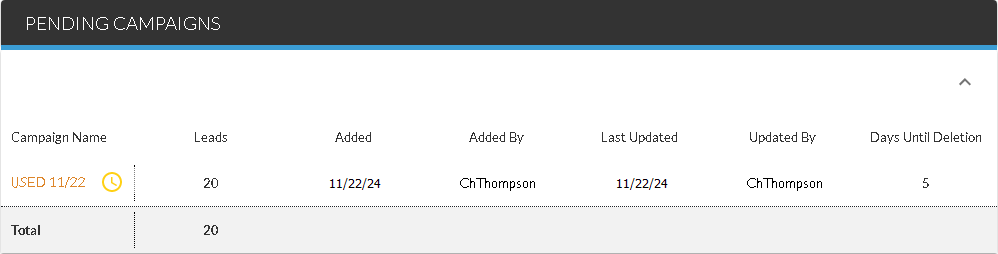
The Pending Campaigns panel displays only if one or more sales campaigns have been added but not sent.
The following columns display in the Pending Campaigns panel.
Campaign Name: (Link) The name of the campaign displays as a link. Click the link to display the Pending Campaign Details panel for the selected campaign. In addition, an icon displays to indicate whether pre-screen requests have been sent for the campaign.
The following icons can display.
-
 (Complete). Results for the pre-screen requests have been received.
 -
 (Pending). The pre-screen requests are still processing.
Note - Pre-screen results are only available if FOCUS or the Customer application
Leads: The total number of leads generated from the campaign displays.
Added: The date that the campaign was created displays.
Added by: The User ID of the user that created the campaign displays.
Last Updated: The date that the campaign was last updated displays.
Updated By: The User ID of the user that last updated the campaign displays.
Days Until Deletion: The number of days until the campaign is removed from the XtreamService application displays.
Note - Leads added to a sales campaign are not available for use in other sales campaigns until the first sales campaign has been either sent or deleted. Sales campaigns remain in pending status for a maximum of five days before they are automatically deleted from the XtreamService application. Once a pending campaign is deleted, the leads are removed from the campaign and can be added to a new sales campaign.
Click here for a list of products that may be mentioned in this help file.